

Available Formulations
Every ERx system is different, so it is important to ensure your ERx properly works with our software system by submitting a test script. The information below will guide you through the entire process.
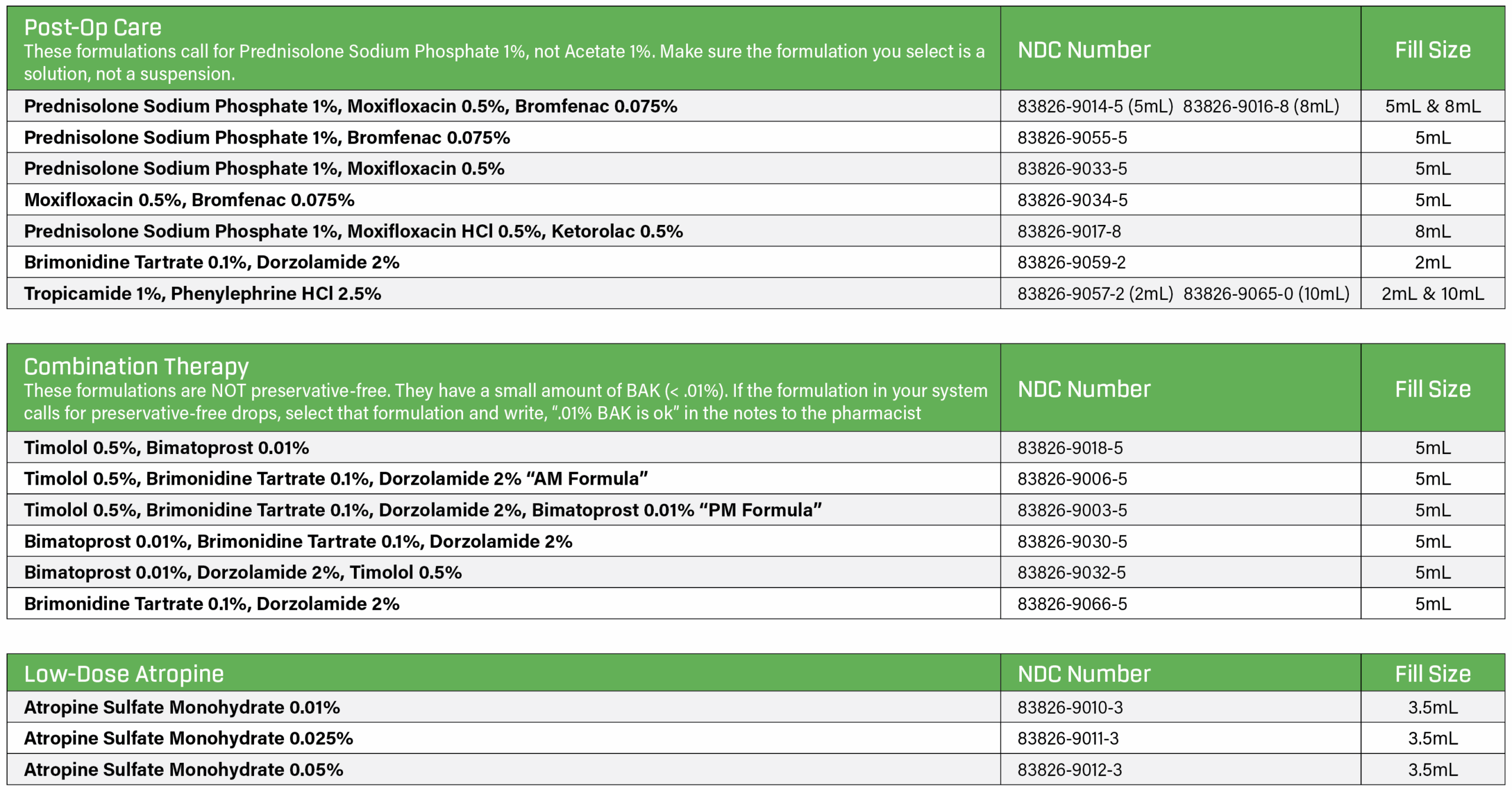
*For professional use only. OSRX specializes in customizing compounded medications to meet unique patient needs. Compounded drugs are not FDA-approved, which means they have not undergone FDA premarket review for safety, effectiveness, and quality. View potential adverse events and contraindications at: www.osrxpharmaceuticals.com/osrx-api-aecontraindication
Ordering Through Your EMR System
1. Locate the Pharmacy
OSRX Pharmacy is listed in most ERx systems as OSRX in Missoula, MT. Note that it may appear in the mail order or the retail pharmacy section. OSRX identifying numbers are below.
OSRX
1120 Kensington Ave., Suite E, Missoula, MT 59801
Phone: (855) 466-1076
Fax 1: (406) 541-6267, Fax 2: (866) 515-0196
NCPDP: 2784418 NPI: 1588122345 Surescripts ID#: PKX27844180551314764
2. Product/Formulation Breakdown
- Search for one of the compound ingredients (“Pred” for Prednisolone/Moxifloxacin/Bromfenac) and select compound from the EMR list.
- Most ERx systems have our formulations in their database; you just need to search for them and confirm the quantities and strengths match. If a formulation does
not appear exactly as it is listed above, we will contact your office to confirm the correct medication before shipping. - To help avoid this situation, write a message in the notes section of your e-script so the pharmacist knows a substitution is approved. For example: If Prednisolone/Moxifloxacin/Bromfenac appears in your ERx as 4mL, but the OSRX formulation is 5.0mL, write “5mL is ok”.
3. Sending the Test Script
- Under a test patient, search for a new pharmacy or add it in manually with the OSRX info on the previous page, then save it to favorites.
- Search for these formulations and make sure the strengths and quantities (mL) match. Under search for medication, for example, start by typing the word “prednisolone.”
- If the formulations aren’t in the system, try to add them under the free-form compounding tab and save to favorites.
- As a last resort, try sending us a script for prednisolone 1% and add the rest of the formula in the notes section. – For example: Select prednisolone 1%, 5mL, and in the notes section put “add bromfenac 0.075%, prednisolone phosphate and 4.0mL is ok”.
- Send a test script to ensure the patients phone number and address come through on our end. (They don’t always come through properly). MAKE SURE YOU SEND A TEST SCRIPT, but don’t worry, WE WILL NOT FILL a script with “TEST” as the patient name. Save the formulation under the doctor list or favorites so it is easily accessible for future scripts.
Questions?
Contact our pharmacy team at support@osrxpharmaceuticals.com or (855) 466-1076.